
Troubleshooting Slow Networks
Identify and resolve performance issues that cause delays and application slowdowns with MIVU. Real-time monitoring detects congestion, bandwidth limits, and bottlenecks early.

Common Performance Issues We Diagnose
We help businesses identify, analyze, and resolve network slowdowns with MIVU that affect speed, stability, and user experience. Our proactive approach ensures faster troubleshooting and long-term network reliability.

Network Congestion
Excess traffic overwhelming bandwidth and slowing data transfer.

High Latency
Delayed data packets impacting application responsiveness.

Device Overload
Overburdened routers, switches, or servers causing bottlenecks.

Misconfiguration Errors
Incorrect network settings restricting optimal performance.

Packet Loss
Data packets failing to reach their destination, reducing reliability.

Hidden Bottlenecks
Performance gaps within complex network paths that are hard to detect.
Why Network Troubleshooting Is Important to Minimize Downtime?
Network issues can lead to outages if not detected early. Problems like high latency or bandwidth overload can slow applications and disrupt work. Splitpoint Solutions provides monitoring and troubleshooting solutions to maintain stable connectivity and prevent downtime.
Prevents Service Interruptions
Early detection of issues helps prevent outages and keeps critical systems running.
Maintains Productivity
Stable networks allow teams to work without delays or disruptions.
Protects Revenue
Reliable connectivity prevents losses from downtime and failed transactions.
Improves System Reliability
Continuous monitoring helps maintain consistent and dependable network performance.
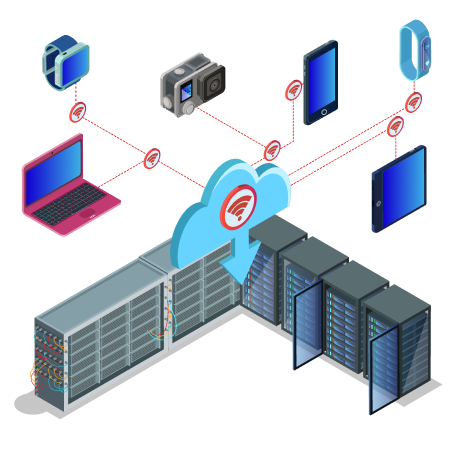
How Troubleshooting Slow Networks Works
Slow network performance can impact applications, users, and daily operations. A structured troubleshooting process helps identify the root cause and restore stable connectivity.

Network Assessment
Review latency, bandwidth, and traffic to identify slowdowns.

Monitor in Real Time
Track network activity to quickly detect congestion and delays.

Identify Root Causes
Find bottlenecks, device overload, or configuration issues.

Apply Fixes & Optimize
Resolve issues and adjust settings for stable network performance.
Why Choose Us
See why leading enterprises are switching to Splitpoint Solutions.
| Monitoring Capability | Splitpoint MIVU | Traditional Monitoring Tools |
|---|---|---|
| Deployment Time | Minutes | Days–Weeks |
| Visibility Across Environment | Unified Dashboard | Multiple Tools & Dashboards |
| Alert Intelligence | AI-Powered & Context-Aware | Rule-Based Alerts |
| Root Cause Analysis | Automated Insights | Manual Investigation |
| Data Collection | Lightweight Probes | Agent-Heavy Deployments |
| Monitoring Coverage | Network, Infrastructure, Applications & User Experience | Siloed Monitoring Tools |
| Scalability | Flexible & Easily Scalable | Additional Licensing & Configuration Required |
| Performance Insights | Real-Time Visibility & Analytics | Delayed or Historical Reporting |
Reliable Network Troubleshooting You Can Trust
We monitor your networks without ever accessing patient data. Our security-first approach ensures your organization stays compliant while gaining complete network visibility with MIVU.

Performance Monitoring
Continuously track latency, bandwidth, and traffic to detect slowdowns early.

Root Cause Identification
Identify bottlenecks, device overload, and configuration errors affecting speed.

Safe Diagnostics
Investigate performance issues without interfering with critical applications.

Detailed Issue Reporting
Receive clear insights and logs to understand problems and prevent future slowdowns.
Trusted by leading companies across industries






Why teams
choose
Splitpoint
Built to give your team complete visibility and control over the systems that matter.

See everything in one place
Eliminate blind spots. Monitor network, infrastructure and applications together, instead of stitching together separate tools.

Find the root cause faster
Move from guessing to knowing. Trace an issue across the stack and fix it before it reaches your users.

Built for enterprise scale
Designed to handle high-volume environments without slowing down or losing detail.

Your data, your control
Analyse, troubleshoot and report on your own terms, with full access to the underlying data.
All Articles
Network Monitoring for Schools: Security and Uptime
Network monitoring has become essential for schools, colleges, and universities, which run on...

Network Monitoring Challenges Faced by Schools and Colleges
Running a campus network today looks nothing like it did even five years ago. Between online...

Key Types of Network Monitoring Used in the Education Industry
A district can run three monitoring tools and still not know why a state assessment stalled in the...

Top 11 Network Monitoring Tools for the Education Industry
A district network can pass every uptime check on the dashboard and still be failing. Ninth period...

Hybrid Infrastructure: The Enterprise Blueprint for Modern IT Operations
Enterprise IT no longer runs from a single location. Most organizations today operate distributed...
Top 5 Features to Look for in Data Center Network Monitoring Tools
Data center network monitoring tools are software platforms that continuously track the health,...
Frequently Asked Questions
Everything you need to know before getting started with Splitpoint Solutions.
What are the common causes of slow networks?
Slow networks are often caused by bandwidth congestion, outdated hardware, or high traffic usage. Malware, misconfigured routers, and weak Wi-Fi signals can also reduce performance.
What role does latency play in slow networks?
High latency increases delay in data transmission. This can affect video calls, gaming, and cloud applications.
What tools help in troubleshooting slow networks?
Network monitoring and speed testing tools identify performance issues. They provide insights into traffic usage and bottlenecks.
Can too many browser tabs slow down network speed?
Multiple active tabs may consume system and network resources. Closing unused tabs can improve browsing performance.
How does traffic prioritization help in troubleshooting slow networks?
Traffic prioritization ensures critical applications get sufficient bandwidth. This improves performance for important tasks.