
Network monitoring has become essential for schools, colleges, and universities, which run on networks the same way hospitals run on power. Attendance systems, grading platforms, online testing tools, campus Wi-Fi, and remote learning apps all depend on a network that stays online and stays safe. When that network slows down or gets breached, the disruption reaches teachers, students, and parents within minutes. Education network monitoring gives IT teams at schools, colleges, and universities a clear view of what is happening across their systems at any given moment.
It tracks traffic, flags unusual activity, and shows where slowdowns are starting before they turn into full outages. For schools managing hundreds or thousands of connected devices, this kind of network security visibility is no longer optional. It is the difference between catching a problem in minutes and finding out about it from an angry parent email.
Why Educational Networks Carry More Risk
A typical school network handles far more variety than a standard office network. Students bring personal laptops, tablets, and phones. Teachers connect smart boards, printers, and streaming devices. Administrative staff run finance and student record systems that store sensitive data. Add campus-wide Wi-Fi, guest access for visitors, and remote learning tools, and the network becomes a wide, constantly shifting surface to manage.
This mix creates two problems at once. First, there are more devices and connection points than most IT teams can track by hand. Second, many of those devices are not fully controlled by the school, since students and staff bring their own hardware. Both problems raise the risk of security gaps and performance issues that go unnoticed until something breaks, which is exactly why security and reliability have to be watched together instead of as separate concerns.
How Network Monitoring Strengthens Security
Educational institutions are frequent targets for cyberattacks, a risk the U.S. Cybersecurity and Infrastructure Security Agency (CISA) sets out in its K-12 cybersecurity report. Student and staff records include personal details, health information, and sometimes financial data tied to tuition and payroll. That combination makes schools attractive targets for ransomware groups and data thieves, and small IT teams rarely have the staff to check every login and connection by hand.
1. Watching for a Breach in Progress
IT security monitoring watches network traffic continuously instead of relying on manual checks. Flow data (NetFlow, sFlow, IPFIX), SNMP device metrics, and packet-level analysis give IT teams a record of which devices are talking to each other, and how much data is moving between them. It looks for patterns that suggest a breach, such as a device suddenly sending large amounts of data outside the network, a device opening connections to systems it has never contacted before, or traffic reaching unfamiliar destinations late at night.
A compromised student laptop trying to scan other devices on the same Wi-Fi network is a common early signal, and, where flow data from switches. And wireless controllers is collected, monitoring can flag that behavior before it spreads to the systems that store grades or financial records.
2. Keeping Student Devices Away From Sensitive Systems
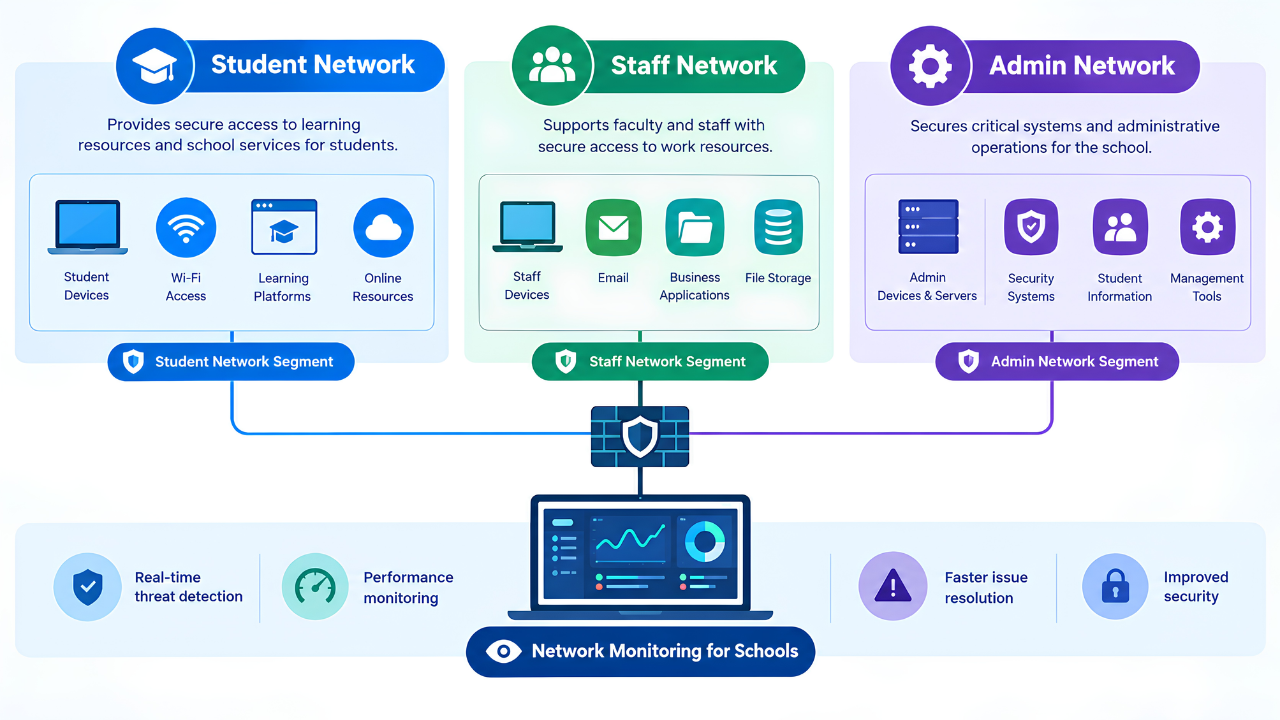
One of the most direct security practices in education networks is separating student and guest devices from the systems that run finance, HR, and student records. This kind of segmentation limits what a compromised device can reach. Monitoring supports this by showing IT teams exactly which devices are talking to which parts of the network. So a laptop that should only be reaching the learning platform, but is instead trying to connect to the finance server, is flagged as it happens rather than found during an audit months later.
3. Reducing the Time Between Attack and Response
The real cost of a school data breach usually comes from how long it goes unnoticed, and IBM’s annual Cost of a Data Breach Report consistently links longer breach lifecycles to higher costs. Phishing emails aimed at staff, malware spread through shared lab computers, and attacks on unpatched systems are common risks. But the damage compounds the longer they sit undetected. A staff member who clicks a phishing link on a Monday morning might not raise any flags on their own.
If their laptop then opens connections to the payroll server for the first time, or starts sending unusual volumes of data outbound, that is the kind of pattern network visibility is built to surface. Continuous monitoring shortens the window between the initial click and the moment IT staff act, generating alerts as suspicious activity happens. And giving staff a chance to isolate a device, disable an account, or reset credentials before data is lost rather than after.
This matters more in education than in most industries because the people using the network change every year. Each new school year brings a fresh group of students who have never been trained on the district’s security practices. Along with staff turnover that leaves some accounts active longer than they should be. Monitoring does not depend on every user following the rules correctly. It watches behavior directly, so a new student device behaving oddly gets flagged the same way a device still using an old, forgotten staff account would.
How Network Monitoring Improves Reliability
Security gets most of the attention, but reliability failures disrupt as many students and staff, and far more visibly. A network outage during state testing, a slow connection during a virtual class. A dropped Wi-Fi signal in a lecture hall creates problems that cannot simply wait until someone gets around to fixing them.
1. Catching Load Problems Before Testing Windows
Certain days put far more strain on a school network than others, particularly standardized testing periods when hundreds of devices in the same building connect at once to run the same platform. Monitoring tracks bandwidth use, latency, and device load leading up to these windows. So IT teams can spot an access point that is already struggling before the testing period begins, rather than during it.
2. Finding the Failure Before Students Report It
Network reliability depends on knowing where weak points exist before they cause a failure. Aging switches, overloaded access points, and bandwidth bottlenecks during peak hours are common causes of slowdowns in education settings. Monitoring tools track performance metrics like latency, jitter (which matters most for live video lessons), packet loss, and device health across the network. So a failing switch in one building shows up as a fault on a dashboard before it takes an entire wing offline and generates a wave of help desk tickets.
Hardware in schools also tends to run longer than it should before it gets replaced, simply because budgets do not always allow for regular refresh cycles. A switch or access point nearing the end of its useful life often shows warning signs before it fails outright. Such as rising latency or intermittent drops that come and go throughout the day. Monitoring picks up on these patterns over time, which gives IT staff evidence to justify a hardware replacement before the device fails during a class period. Rather than trying to explain an outage after it already happened.
3. Keeping Access Consistent Across Buildings
Consistent network reliability also supports fair access to learning. When a network works the same way in every classroom and every dorm building, students and teachers are not held back by uneven technology. Infrastructure monitoring tracks the health of switches, routers, and access points across every building on a campus. This matters most for institutions with multiple buildings or satellite sites. A failed device in a secondary location should not go unnoticed simply because it is not the main building.
Where Application and End-User Experience Monitoring Fit In
Security and reliability both depend on visibility that goes past the network wires themselves. Learning management systems, grading platforms, and testing software run as applications on top of the network. And if one of these tools slows down during a live exam, the cause could be the application, the network connection, or a server issue. Application performance monitoring separates these causes so IT teams are not guessing during a live incident.
Reliability ultimately comes down to what a student or teacher experiences on their own device. End-user experience management measures performance from that point of view, tracking things like page load times and connection quality on individual devices. This layer tells IT staff whether a complaint about a slow network is isolated. To one device, one building, or a wider issue affecting the whole campus, which shapes how fast and how broadly the response needs to be. Read more on why user experience management matters, or see how each layer fits together in Key Types of Network Monitoring Used in the Education Industry.
Why Automated Monitoring Fits School IT Teams
School IT departments are often small, and staff are pulled in many directions at once, covering hardware repairs, help desk tickets, software rollouts, and security all at the same time. Watching network traffic around the clock for both security threats and reliability issues is difficult to add on top of that workload.
Automated, always-on monitoring puts continuous visibility behind a school network without adding headcount. Instead of IT staff having to check dashboards manually or wait for a problem to be reported. Monitoring detects and surfaces issues as they happen, with alerts routed to the right person. So the internal team can focus on fixing them instead of searching for them. This model fits the reality of most education IT departments, where headcount is limited but the network keeps growing in size and complexity every year.
Conclusion
Network monitoring gives educational institutions the visibility they need on two fronts at once. Catching security threats before data is exposed, and catching reliability problems before classrooms lose access. As schools add more devices, more remote learning tools, and more digital systems each year. The ability to see both types of problems early becomes central to how well a campus network holds up.
For IT teams stretched thin across security, hardware, and daily support tickets, automated monitoring can carry the weight of continuous network visibility. Splitpoint Solutions works with organizations that need dependable oversight across complex networks. Including the layered infrastructure, application, and device demands of modern schools and campuses. Mivu, Splitpoint’s observability platform, brings network, infrastructure, application, and end-user experience monitoring into one view. Book a Mivu demo to see how your campus network performs, from the core switch to the classroom device.
FAQ
1. How does network monitoring improve security in schools?
It watches network traffic continuously for signs of a breach, such as unusual data transfers, connections to unfamiliar destinations, or a device trying to reach parts of the network it should not access. This lets IT teams respond to a threat while it is happening instead of finding out after data has already been exposed.
2. How does network monitoring improve reliability in schools?
It tracks performance metrics like latency, jitter, packet loss, and device health across switches, access points, and applications. This helps IT teams find a failing device or an overloaded connection before it causes an outage. That affects a classroom, a building, or a testing window.
3. Can monitoring separate student devices from sensitive school systems?
Monitoring itself does not create network segmentation, but it shows IT teams exactly which devices are connecting to which parts of the network. This visibility supports segmentation policies that keep student and guest devices away from finance, HR, and student record systems.
4. Why do testing periods put extra strain on school networks?
Large numbers of devices in the same building connect to the same testing platform at the same time, which increases the load on Wi-Fi access points and internet bandwidth. Monitoring tracks this load ahead of testing windows so weak points can be addressed before the testing period starts.
5. Is automated network monitoring a good fit for small school IT departments?
Yes. Small IT teams often lack the staff to watch network traffic around the clock for both security and reliability issues. An automated monitoring platform surfaces issues as they happen, letting internal staff focus on resolving problems instead of searching for them.
6. What should schools look for in a network monitoring tool?
Look for a platform that covers network, infrastructure, application, and end-user experience monitoring in one view, collects flow and SNMP data from switches, routers, and wireless controllers, scales across multiple buildings or campuses, and alerts on both performance problems and unusual traffic. For a comparison of options, see Top 11 Network Monitoring Tools for the Education Industry.